gimpusers.com logo
German version English version

Not logged in

Sign up! | Lost password?

Latest discussion

  1. gimp-user | today 10:18 AM
    Installing gegl for gimp-2.7
  2. gimp-user | today 05:37 AM
    gimp
  3. gimp-user | today 03:30 AM
    Enlarge Canvas: Is there a way to do it by dragging? Could/Should there be?
  4. gimp-user | today 03:10 AM
    Quick compiling question
  5. gimp-developer | yesterday 06:57 PM
    GIMP distributing sRGB profiles: license issues?

External news

Poll

Would you like to be able to use your Google/Yahoo/MSN (OpenID) login on gimpusers, too?

Definately! I would enjoy the possibility to use my OpenID on different websites!

I don't have a special need for OpenID but I think it could be useful

Doesn't matter to me

Never, OpenID is a pain regarding privacy and personal data protection!

No. (please post a comment)

See results

Stats

gimpusers.com RSS feed

RSS feed Retweet this!

04 Sep 2009 04:39 PM, by devvv (Bernhard Stockmann), translated to English by redforce (Richard H.)

Preview: GIMP 2.8 - the new features

Most probably, GIMP 2.8 will yet be released 2009, so it has been time to have a look at the current developer version. There are many cool new features, but the most important thing for us are the layer groups.

This article has been written using GIMP 2.7. It's divided into 18 steps and takes about 30 min to complete for an average user. 57291 times read so far. Category: Basics, required skill: 1 of 5

54 comments have been posted so far.

Available in other languages:

Relevant links:

  1. 1
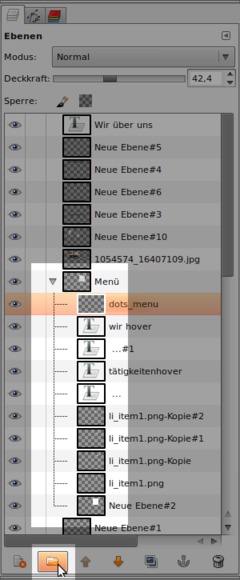
    Finally here: layer groups!
    It's now possible to group layers into folders in a tree-like way. You can move and show/hide all layers of a group at once so it will finally be possible to create complex layouts without getting lost. The layer sets don't work perfectly, since layer masks don't work yet for example. Nevertheless the basic behaviour works quite well already!
    GIMP 2.8 Layer group
    Click to enlarge
  2. 2
    New: Rotating brushes, brush aspect ratio

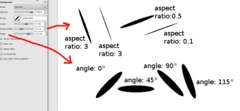
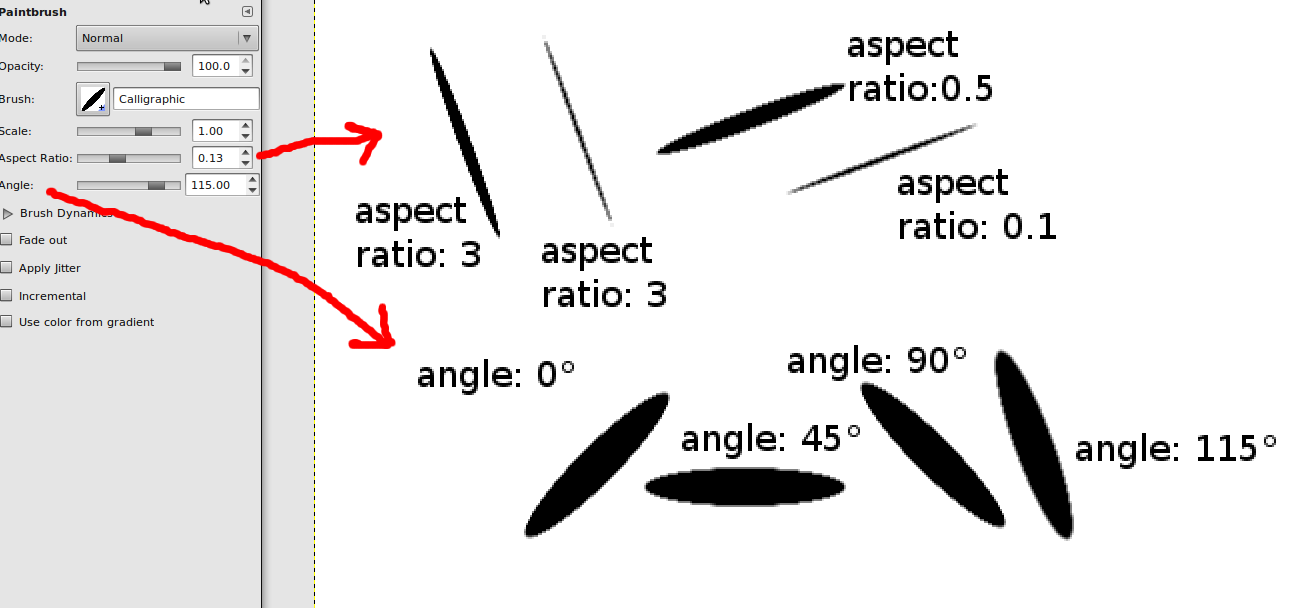
    Finally, you can rotate brushes at your will. Very useful, especially for drawers and painters.

    The aspect ratio allows you to squeeze a brush along the horizontal/vertical axis.
    Screenshot of step 2
    Click to enlarge
  3. 3
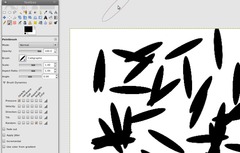
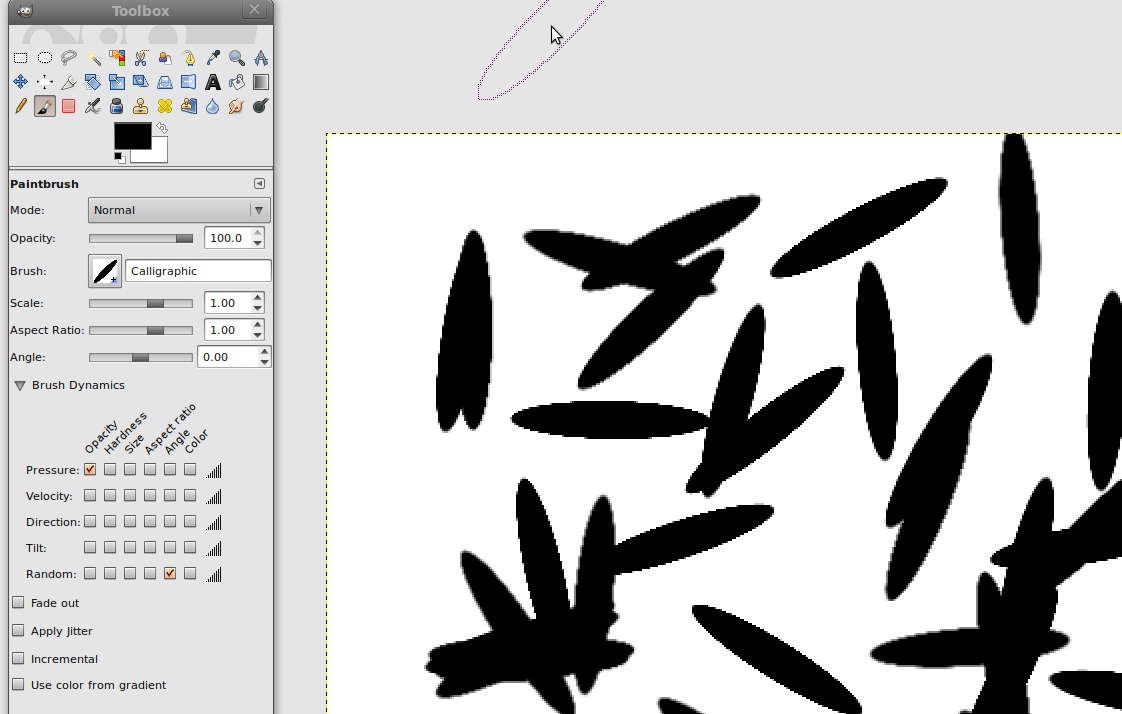
    Brush dynamics have been extended to comprise rotation, inclination (angle) and aspect ratio.
    Screenshot of step 3
    Click to enlarge
  4. 4
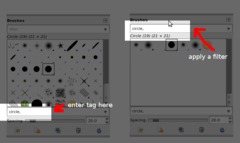
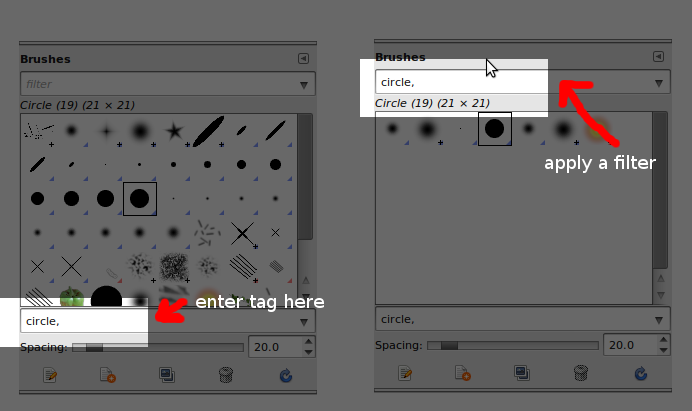
    New & useful: resource tagging

    All kinds of GIMP resources (brushes, fonts, patterns, gradients etc) can be "tagged" now. Then you can filter resources by these tags, so you can manage huge amounts of resources quite easily.
    Screenshot of step 4
    Click to enlarge
  5. 5
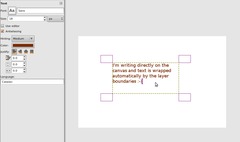
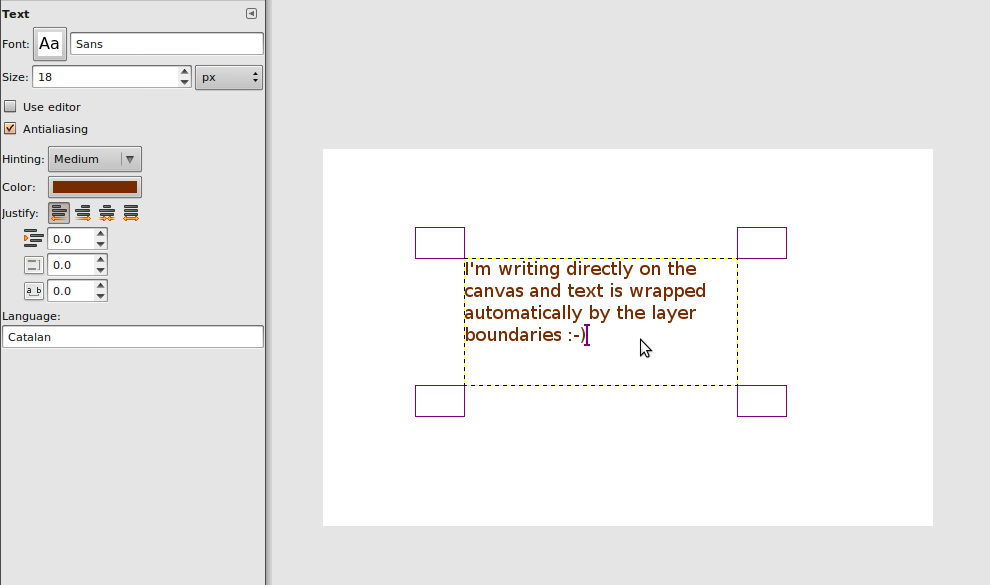
    FINALLY: On-canvas editing: Write your text directly on the canvas (no input window needed anymore, although you can still use it if you want to do so).

    Also, the possibilities for font hinting have been exteneded.

    However, it's still not possible to format certain words within a text (only the whole text block).

    To edit a text block again, you first have to click on the layer in the Layers window. Then use the Text tool and click on the existing text block.
    Screenshot of step 5
    Click to enlarge
  6. 6
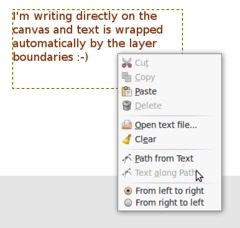
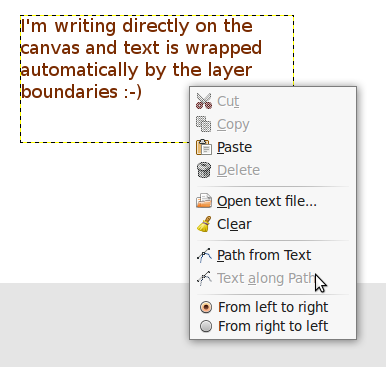
    "Path from text" has been moved to the context menu:
    Screenshot of step 6
    Click to enlarge
  7. 7
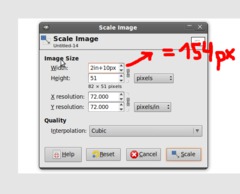
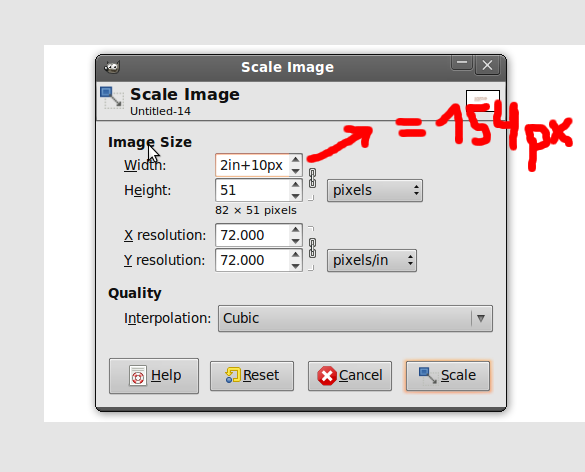
    It's now possible to do calulcation in input fields. For instance, you can scale an image (Image / Scale image) to "2*100px+1in". This value will be converted to the required units (here 272 px).
    Screenshot of step 7
    Click to enlarge
  8. 8
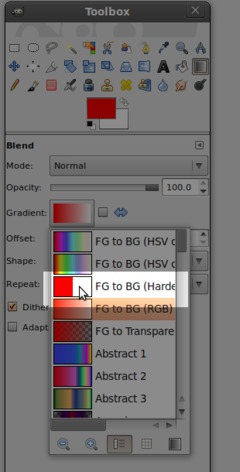
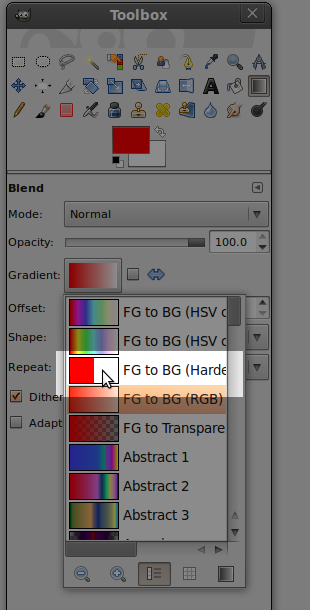
    New default gradient available: a hard gradient between foreground and background color
    Screenshot of step 8
    Click to enlarge
  9. 9
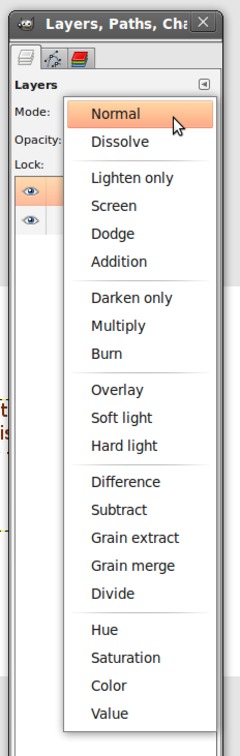
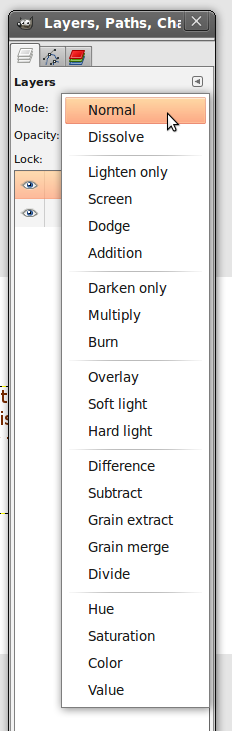
    Layer modes have been grouped by context for easier use. For example, all modes that darken/brighten the image are arranged together now.
    Screenshot of step 9
    Click to enlarge
  10. 10
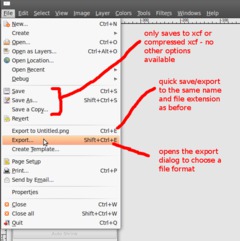
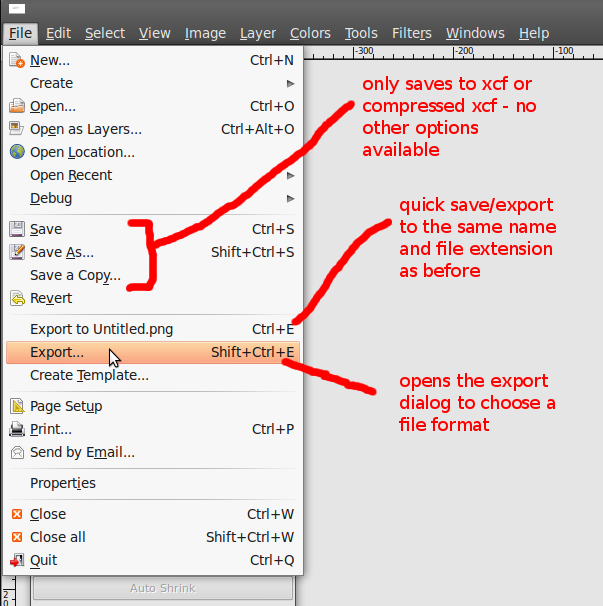
    Completely different: Exporting to other formats like JPEG or PNG isn't possible via File / Save anymore, but only via File / Export.

    File / Save is only used to save images using the native GIMP format ".xcf" (or .xcf.gz, .xcf.bz2 for compressed files).

    If you want to create a JPEG, PNG, TIFF etc. image file, you have to use File / Export. This new UI behaviour saves some time that would be wasted by dialogs (the hint that the image is reduced to one layer e.g.) otherwise.
  11. 11
    Quickly export to JPEG/PNG without specifying options every time

    Above the Export menu entry, you can find a quick export function that you can use to export your current image without having to specify format-specific settings (compression and so on) every time.
    Screenshot of step 11
    Click to enlarge
  12. 12
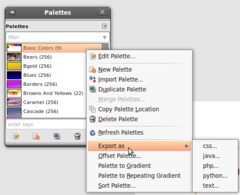
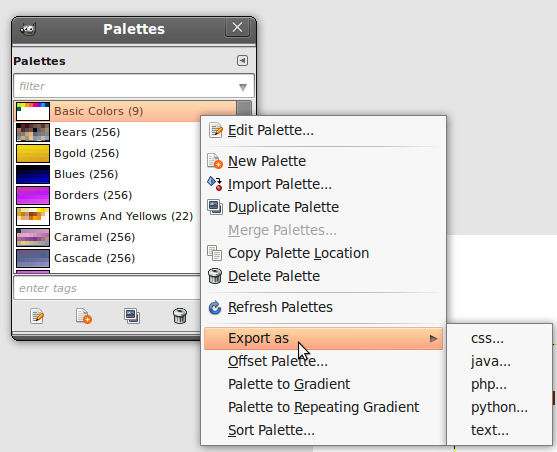
    Image palette: export to CSS, PHP, Java, Python or plain text

    You can now export color values in several formats. If you choose PHP, Python or Java, the colors are declared as variables. For CSS, unnamed classes will be created and plain text files will only contain a Hex code list.
    Screenshot of step 12
    Click to enlarge
  13. 13
    Vector layers should be integrated since 2006, but now the chances are good that they are relased with GIMP 2.8. We'll see if it fits into the time plan.
  14. 14
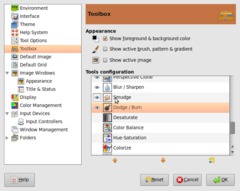
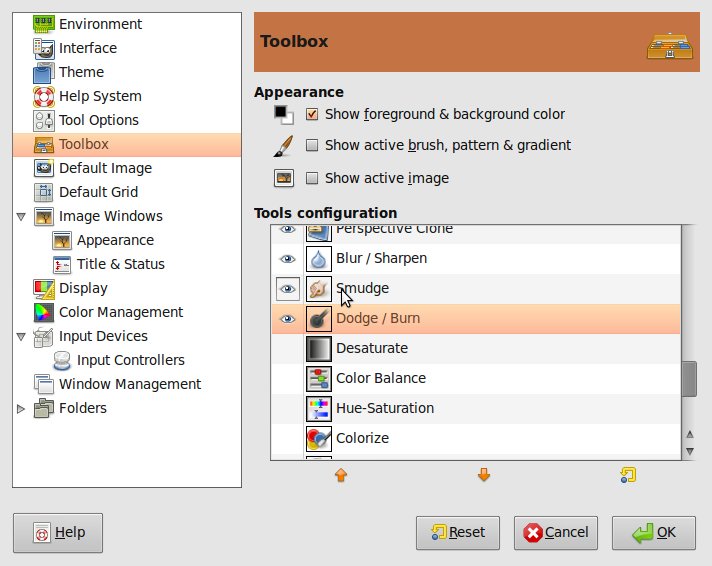
    Customization of the Tool window is now possible via the Edit / Settings dialog. Tools can be sorted by priority or removed completely.
    Screenshot of step 14
    Click to enlarge
  15. 15
    Hotkeys:
    New: Alt(+Shift)+click = Alpha from layer
    New: Ctrl+Shift+E = File / Export
    New: Ctrl+E: quick export
    Modified: Ctrl+Shift+R = Resize canvas to window size
    Modified: Ctrl+R = Resize window to canvas size
  16. 16
    Other changes:
    - Canvas edges are now "magnetic"
    - Support for JPEG2000
    - Support for 16 bit RAW import
  17. 17
    The GEGL library is now resposible for layer modes and the mixing of the layers to the resulting image.

    So the most important GEGL functions are integrated to GIMP now and the course for GIMP 2.10 / 3.0 is set. This will allow great new features for future versions, but not before 2010.
  18. 18
    GUI changes
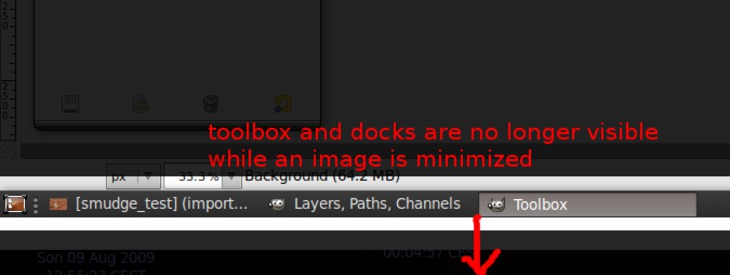
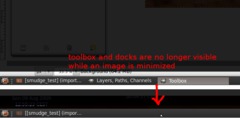
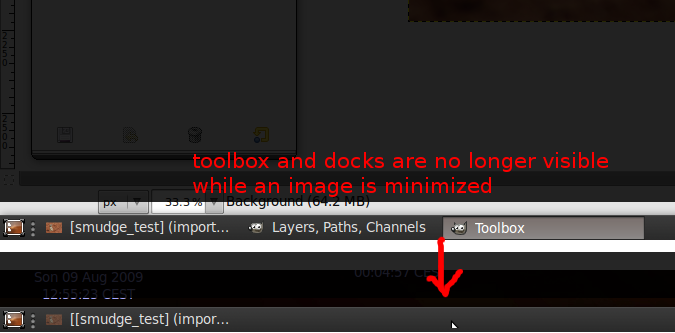
    - When the window is minimized, the Tools window and other aren't shown anymore.
    - The close button (X on right top) doesn't close the whole application anymore but only the Tools window. GIMP is closed as soon as the last image window is closed or you choose File / Exit.
    Screenshot of step 18
    Click to enlarge

This article is licensed under the following license: Attribution-Noncommercial 3.0 Austria

Links (pingbacks)

Comments

Post your own comments, questions or hints here. The author and other users will see your posting and can reply to it. Of course, you can also ask in the chat.

Comments are chronologically arranged.

1 rating(s) with 4.0 of 5 stars in average

  1. http://www.gimpusers.com/tutorials/gimp-2-8-new-features.html Fri 04 Sep 2009 05:32:00 PM CEST jstavast, 04 Sep 2009 05:32 PM

    In point 7 "It's not possible to do calulcation in input fields."

    Should that "not" be "now"? Reading the rest of the point implies that it is now possible.

  2. http://www.gimpusers.com/tutorials/gimp-2-8-new-features.html Fri 04 Sep 2009 05:35:22 PM CEST redforce, 04 Sep 2009 05:35 PM

    LOL thanks I have changed it now

  3. http://www.gimpusers.com/tutorials/gimp-2-8-new-features.html Fri 04 Sep 2009 07:44:40 PM CEST sirgandolf, 04 Sep 2009 07:44 PM

    "- Support for 16 bit RAW import"

    Question - I have some grayscale alphas from another program that saves them in 16bit psd. Will the 16 bit RAW import allow me to work on them and then save/export back to a 16bit psd?

  4. http://www.gimpusers.com/tutorials/gimp-2-8-new-features.html Fri 04 Sep 2009 09:49:46 PM CEST mahvin, 04 Sep 2009 09:49 PM

    On #5, regarding canvas editing. Does this mean also, that font can be resized by "rubber bands" (dragging out the textbox) on the canvas and not by inputting a new size in the font toolbox? If so, this will totally rock!

  5. http://www.gimpusers.com/tutorials/gimp-2-8-new-features.html Sat 05 Sep 2009 04:18:29 AM CEST mamboze, 05 Sep 2009 04:18 AM

    Thanx guys, lots of very useful improvements.

  6. http://www.gimpusers.com/tutorials/gimp-2-8-new-features.html Sat 05 Sep 2009 08:25:22 AM CEST TomF, 05 Sep 2009 08:25 AM

    I say, "Yes, Yes, Yes" to every change.

  7. http://www.gimpusers.com/tutorials/gimp-2-8-new-features.html Sun 06 Sep 2009 12:08:32 AM CEST devvv, 06 Sep 2009 12:08 AM

    Update: Layer groups. Thanks to user "eek"

  8. http://www.gimpusers.com/tutorials/gimp-2-8-new-features.html Sun 06 Sep 2009 06:35:26 AM CEST Mr.Dust, 06 Sep 2009 06:35 AM

    I translated this awesome article to Korean.
    http://mr-dust.pe.kr/entry/gimp-2-8-new-features

  9. http://www.gimpusers.com/tutorials/gimp-2-8-new-features.html Mon 07 Sep 2009 04:29:32 PM CEST WWWWolf, 07 Sep 2009 04:29 PM

    Layer groups! Oh how many times I have wished this would be possible! Better brushes! Oh yes oh yes oh yes!

    ...but File-Export is *not* tempting. Mostly because *most of the time* I'm working on non-.xcf formats, and there really should be only one way to save files for the sake of consistency. Oh well, it doesn't seem like a big thing to worry about, but still...

    Now, all I really want from GIMP is to get rid of this useless big empty window and go back to the 2.4 behaviour that worked much better. Pretty please???

  10. http://www.gimpusers.com/tutorials/gimp-2-8-new-features.html Mon 07 Sep 2009 06:29:04 PM CEST Nederhoed, 07 Sep 2009 06:29 PM

    Super! Very happy with point 11. Looking forward to installing. Thanks to all, Robert

  11. http://www.gimpusers.com/tutorials/gimp-2-8-new-features.html Tue 08 Sep 2009 02:16:39 AM CEST Liz, 08 Sep 2009 02:16 AM

    I don't like those GUI changes. First, I minimize my image window constantly. I don't mind the clutter and I hope I have a CHOICE to determine whether or not I want it to turn into one window.

    STOP MAKING GIMP INTO PHOTOSHOP! THIS IS WHY PEOPLE MOVE ONTO GIMP! KEEP GIMP GIMP!

    The reason I use GIMP is NOT because I want to use another clone of Photoshop! PS's workflow is slow anyways!!

  12. http://www.gimpusers.com/tutorials/gimp-2-8-new-features.html Tue 08 Sep 2009 03:06:57 AM CEST Elijah, 08 Sep 2009 03:06 AM

    Wow this is pretty sweet! Grouped layers! Layer masks (I know not yet, but soon). On canvas text editing! Bush dynamics yay! Vector layers coming soon, SWEET!

    Hopefully soon we will see non-destructive text effects too! Gimp is awesome!

  13. http://www.gimpusers.com/tutorials/gimp-2-8-new-features.html Tue 08 Sep 2009 05:10:34 AM CEST gimp user, 08 Sep 2009 05:10 AM

    please give us tools such as drawing shape & arrows ,and probably other simple tool kits that are just good enough for newbies. thanks a lot!

  14. http://www.gimpusers.com/tutorials/gimp-2-8-new-features.html Tue 08 Sep 2009 09:39:16 AM CEST Roland B., 08 Sep 2009 09:39 AM

    What about 16 bits editing? Will this feature be at last in Gimp 2.8?
    We desperatly need it for serious photo editing...
    Thanks,
    RB

  15. http://www.gimpusers.com/tutorials/gimp-2-8-new-features.html Tue 08 Sep 2009 09:46:43 AM CEST sirgandolf, 08 Sep 2009 09:46 AM

    ditto RB's post. My 3d software likes 16bit grayscales and only accepts psd for import and export.

  16. http://www.gimpusers.com/tutorials/gimp-2-8-new-features.html Tue 08 Sep 2009 12:07:19 PM CEST Bob, 08 Sep 2009 12:07 PM

    <i>What about 16 bits editing? Will this feature be at last in Gimp 2.8?</i>

    Ditto, will we be able to edit half and full float exr or should I continue ignoring the gnu image manipulation program in favor of programs that don't ignore their users needs for 10 years?

  17. http://www.gimpusers.com/tutorials/gimp-2-8-new-features.html Tue 08 Sep 2009 12:34:37 PM CEST Ian Tester, 08 Sep 2009 12:34 PM

    Yes, another vote for handling 16-bit component images. I still have to use an ancient, slow, and quite buggy version of CinePaint to work on my 16/48-bit film scans.

    As for making The Gimp UI more like Photoshop - I haven't used that program for a dozen years, so cloning its interface does not help me one bit. It's very annoying.

  18. http://www.gimpusers.com/tutorials/gimp-2-8-new-features.html Tue 08 Sep 2009 03:01:33 PM CEST AFormerGimpUser, 08 Sep 2009 03:01 PM

    So, you're heading for being a fully-featured photoshop clone, then? Like: Save a copy.. Com'on, it's one of the most frustrating <strike>bugs</strike> features of Photoshop!

  19. http://www.gimpusers.com/tutorials/gimp-2-8-new-features.html Tue 08 Sep 2009 03:10:18 PM CEST Sam, 08 Sep 2009 03:10 PM

    And yes, yet *another* vote for 16-bit colour channels. DCRAw does a good job of importing *.CRW (canon raw) files but it would be far more better than having to use DCRAW or RawStudio do the colour balance/brightness adjustment before importing the photos in to the Gimp.

    Ah well, at least this release has improved significantly. Congrats, team Gimp!

  20. http://www.gimpusers.com/tutorials/gimp-2-8-new-features.html Wed 09 Sep 2009 04:46:35 AM CEST Larry, 09 Sep 2009 04:46 AM

    @16bit fans:

    No 16 bit in 2.8. Not possible to do until GEGL is fully integrated. And when it is it will go way beyond 16bit. Ask the question again when 2.10 is being worked on. That's when full GEGL functionality is slated to be integrated.

    On the upside, the color processing in 2.8 should be a lot better since the projection code has been ported to GEGL.

  21. http://www.gimpusers.com/tutorials/gimp-2-8-new-features.html Wed 09 Sep 2009 07:34:14 AM CEST Rolf, 09 Sep 2009 07:34 AM

    I have a video up at "Meet the GIMP", which shows a lot of the above described life, in full colour and HD.

    http://meetthegimp.org/episode-118-looking-in-the-crystal-ball-at-gimp-2-8/

  22. http://www.gimpusers.com/tutorials/gimp-2-8-new-features.html Thu 10 Sep 2009 05:05:44 AM CEST kristiang, 10 Sep 2009 05:05 AM

    I would like see the same interfece presented in Dia 0.97...

  23. http://www.gimpusers.com/tutorials/gimp-2-8-new-features.html Fri 11 Sep 2009 07:23:31 PM CEST Jayme Ayres, 11 Sep 2009 07:23 PM

    Grouping of layers, this is awesome! I think it would be important also User can select layerst. I will wait anxiously for this new version

  24. http://www.gimpusers.com/tutorials/gimp-2-8-new-features.html Sat 12 Sep 2009 08:14:40 AM CEST 23dornot23d, 12 Sep 2009 08:14 AM

    Item 10 export ...

    If you want to create a JPEG, PNG, TIFF etc. image file, you have to use File / Export. This new UI behaviour saves some time that would be wasted by dialogs (the hint that the image is reduced to one layer e.g.) otherwise.

    Saves what time for who where ,,, not the user .... this is not a good move ,,,
    It adds more operations for the user ... this is a backward step .... and GIF files are saving as one frame ...what use is that > ?

  25. http://www.gimpusers.com/tutorials/gimp-2-8-new-features.html Sun 13 Sep 2009 08:06:12 AM CEST Gimpy, 13 Sep 2009 08:06 AM

    Will 2.8 finally have the entire program as one window rather than multiple windows? Or at least the option to customize it into one? Like PhotoShop is a single window. And second, will there be a circle took and history brush???

  26. http://www.gimpusers.com/tutorials/gimp-2-8-new-features.html Mon 14 Sep 2009 12:07:54 AM CEST BlendNMix, 14 Sep 2009 12:07 AM

    Gimpy: Use toshop then. If you use Gimp on Linux, you don't see the point to have everything in one window.

    Gimp, stay GIMP!

  27. http://www.gimpusers.com/tutorials/gimp-2-8-new-features.html Mon 14 Sep 2009 02:51:50 AM CEST BlendNMix, 14 Sep 2009 02:51 AM

    Devvv: you don't seem to know Gimp very well, why doing that kind of videos then?

    D'you need your 15minutes?

  28. http://www.gimpusers.com/tutorials/gimp-2-8-new-features.html Tue 15 Sep 2009 07:02:40 AM CEST BlazingChaos, 15 Sep 2009 07:02 AM

    this is a great news for gimp users like me.

  29. http://www.gimpusers.com/tutorials/gimp-2-8-new-features.html Wed 16 Sep 2009 04:51:36 AM CEST 23dornot23d, 16 Sep 2009 04:51 AM

    I have reverted back to 2.6 ..... the save option is stunting the workflow for me ....

    Lets save it .... oh I forgot again ... yes its Ctrl+e after using Ctrl+e+shift ....

    I have just got so used to typing in filename,jpg or whatever and it working ,,,,

    Gif files are only saving as one Frame at the moment which does not make for a very good animation ....

    It might be ok for others ,,,, but it does my head in .... and am still not sure why it makes it easy to program it ....

    Keep up the great work though as I am sure most of the other options are really useful ....

  30. http://www.gimpusers.com/tutorials/gimp-2-8-new-features.html Thu 17 Sep 2009 09:20:57 AM CEST jmwish416bit, 17 Sep 2009 09:20 AM

    Gimp looks great and I look forward to using Gimp whenever it supports 16-bit color. Until then I can't. In the finished photo, 8 bits is fine, especially on a computer monitor. However, raw files from a $500 (or less) camera have 12-16 bits. If you truncate these to 8 bits before adjusting white balance or brightness then the noise and banding are visible. For example, with just 12 bits, you can lighten a section of a dark photo by 4x and you still have 10 bits of resolution. At 8 bits, the 4x brighten gives you 6 bits of resolution which shows obvious banding. Sorry to sound negative or beg. What I've seen of Gimp looks wonderful.

  31. http://www.gimpusers.com/tutorials/gimp-2-8-new-features.html Sat 19 Sep 2009 01:56:24 PM CEST Usuario, 19 Sep 2009 01:56 PM

    That looks great. Also, I would like to see vector layers, because They help when I want add some draws or sings over photos.

  32. http://www.gimpusers.com/tutorials/gimp-2-8-new-features.html Sun 20 Sep 2009 03:30:36 AM CEST Dabe, 20 Sep 2009 03:30 AM

    "File -> Export" is a step backwards.

    Humans shouldn't have to know/care about the difference between "Save" and "Export" (Next, will "Open" only read XCF files, and you have to "Import" JPGs?)

    Gimp's current ability to Do What I Mean (DWIM) has been one of the stellar examples of how software SHOULD work; "File -> Export" is a step backwards.

  33. http://www.gimpusers.com/tutorials/gimp-2-8-new-features.html Mon 21 Sep 2009 05:16:17 PM CEST NinjaMaster, 21 Sep 2009 05:16 PM

    CANNOT WAIT! You had me a brush rotation.

  34. http://www.gimpusers.com/tutorials/gimp-2-8-new-features.html Tue 22 Sep 2009 04:34:19 PM CEST Max, 22 Sep 2009 04:34 PM

    Many years have passed and yet still I'm waiting for GIMP to support 16 bit (12 bit) formats. This feature is waaaaayyy more important than deforming the GUI into a fake Photoshop. I dont like photoshop by the way. Include my vote to the thousand (or countles) voters for keeping GIMP as original program. Please don't ignore our comments. After all, we users ARE the raison d'etre of any software. Thanks.

  35. http://www.gimpusers.com/tutorials/gimp-2-8-new-features.html Sun 27 Sep 2009 12:50:42 PM CEST James, 27 Sep 2009 12:50 PM

    16-bit RAW import. But no 16-bit editing? You import 16 bits per pixel (well, 14 for my camera) and then throw away half the data bits?

    Maybe that works if you're just editing JPEG files for use on the web, but it's not so useful for high-image-quality photography.

  36. http://www.gimpusers.com/tutorials/gimp-2-8-new-features.html Tue 29 Sep 2009 10:39:59 PM CEST Jeffrey Eggenberger, 29 Sep 2009 10:39 PM

    Yes to all the changes!! Hope to see 2.8 soon!!!

  37. http://www.gimpusers.com/tutorials/gimp-2-8-new-features.html Thu 01 Oct 2009 01:51:20 PM CEST Agnivac, 01 Oct 2009 01:51 PM

    I've been using Gimp on Windows since Tor Lillqvist first ported it over. Here's another vote for allowing us to opt for the GIMP user interface rather than a PS look-a-like.

    Gimp - Inkscape - Scribus - Blender - Stay Free! Support Libre Graphics Meeting

  38. http://www.gimpusers.com/tutorials/gimp-2-8-new-features.html Fri 09 Oct 2009 06:56:48 PM CEST d1337r, 09 Oct 2009 06:56 PM

    It would be cool to see text formatting a-la RTF/HTML in GIMP.

  39. http://www.gimpusers.com/tutorials/gimp-2-8-new-features.html Tue 24 Nov 2009 02:22:05 AM CET Don Levin, 24 Nov 2009 02:22 AM

    I do scientific research with a 12-bit camera and PGM images. It's very sad that GIMP can't handle these images.

  40. http://www.gimpusers.com/tutorials/gimp-2-8-new-features.html Sat 28 Nov 2009 04:44:39 PM CET Anoesj, 28 Nov 2009 04:44 PM

    HALLELUJA, Layer Groups!!

  41. http://www.gimpusers.com/tutorials/gimp-2-8-new-features.html Tue 01 Dec 2009 06:08:31 AM CET Paula, 01 Dec 2009 06:08 AM

    I want the newest version of Gimp -- because I love it so far....
    Am hoping to use some brushes in it soon and extend my knowledge and use of this awesome program!!!

  42. http://www.gimpusers.com/tutorials/gimp-2-8-new-features.html Thu 03 Dec 2009 02:30:16 PM CET gwing, 03 Dec 2009 02:30 PM

    I really wish you could just stop \'doing things\' and adding featurettes and interface changes all over the place. It is 16 bit editing that is needed, without that Gimp is not usable for so many of us - the icing is nice, but without the cake it is useless.

  43. http://www.gimpusers.com/tutorials/gimp-2-8-new-features.html Fri 04 Dec 2009 02:31:31 PM CET 23dornot23d, 04 Dec 2009 02:31 PM

    I agree 100% with #42 ..... 16 bit is what is needed here more than anything else ....

    The quality ... can then be improved and then more Photographers/designers should use it ....

    The single window mode feels good to use ..... does anybody know the release date .... for 2.8 ....

  44. http://www.gimpusers.com/tutorials/gimp-2-8-new-features.html Sat 05 Dec 2009 09:34:06 PM CET nico, 05 Dec 2009 09:34 PM

    Absolutely yes to the single window. Multiple windows are annoying.

  45. http://www.gimpusers.com/tutorials/gimp-2-8-new-features.html Sun 06 Dec 2009 06:41:19 PM CET Simanek, 06 Dec 2009 06:41 PM

    For the record, Photoshop is only a single-window application in Windows. On OSX each image has its own window, but in the standard OSX fashion Photoshop only has one menu bar. There is not a menu bar on each window as in the GIMP/Linux. As a professional graphic designer that is used to Pshop on OSX, the multi-window approach is just fine and familiar.

  46. http://www.gimpusers.com/tutorials/gimp-2-8-new-features.html Wed 16 Dec 2009 05:59:13 AM CET Gez, 16 Dec 2009 05:59 AM

    I'm happy with all the enhancements. GIMP is going in the right direction.
    A couple of things for the people that complain about the lack of 16 bits:
    Please stop assuming that developers are idiots because they don't give you higher bit depth right now. That requires a lot of work on the core, and they are doing it but it won't be matter of days. Just learn to wait and meanwhile use workarounds. They exist and you can use them.
    It's not true that is IMPOSSIBLE to work without 16 bit. If you work with multiple exposures and adjustments from your preferred digital darkroom software and work with zones, you can work with GIMP without posterization or visible image degradation.
    It just takes some extra work. Of course it would be nicer to have 16 bits directly, but hey. You can still buy PS if you can't live without it!
    And please stop saying "I won't use it until..." Just do it and save us the warning, we can live with you not using GIMP :-)

  47. http://www.gimpusers.com/tutorials/gimp-2-8-new-features.html Mon 21 Dec 2009 03:13:11 AM CET Thales Oliveira, 21 Dec 2009 03:13 AM

    46. Gez, 16 Dec 2009 05:59 AM "..."
    your words are my words!
    thanks for said those before me ;)

  48. http://www.gimpusers.com/tutorials/gimp-2-8-new-features.html Tue 22 Dec 2009 01:00:07 PM CET Marc, 22 Dec 2009 01:00 PM

    The layer groups is the reason I'm definitely moving to Gimp, since Photoshop Elements doesn't support layer groups. The one major limitation for me is the fact that you can't format text inside a text block. That's a major pain. Hope to see that change in a coming version. Keep it up!

  49. http://www.gimpusers.com/tutorials/gimp-2-8-new-features.html Wed 30 Dec 2009 01:01:20 PM CET Samuel MacLachlan, 30 Dec 2009 01:01 PM

    Yes keep GIMP as GIMP!! I use Photoshop and GIMP . GIMP has its own special things. The only thing I would change and pretty please ask for is the option to put the tool and layer docks into one window with the editing window. But have the option to have the regular style too. :)

  50. http://www.gimpusers.com/tutorials/gimp-2-8-new-features.html Sat 02 Jan 2010 06:21:32 AM CET Jeremy Coleman, 02 Jan 2010 06:21 AM

    Does anyone else have a problem not being able to export to an animated gif in 2.7 series? When I go to export all of the animation options are grayed out even though I can load the same exact file and load it into 2.6.8 and it will export an animated gif just fine.

  51. http://www.gimpusers.com/tutorials/gimp-2-8-new-features.html Thu 21 Jan 2010 12:01:49 AM CET david vilaplana, 21 Jan 2010 12:01 AM

    I don't wanna be ungrateful, so thanks for these changes. But if I can't edit my pics in 16bits this software is almost unuseful for me. It would be easier say nothing and use another soft, but I can see how perfect GIMP would be in 16bit! I encourage you to forget the rest of changes and make a bigger effort to get it! Half on Earth, and me, would be happy!

  52. http://www.gimpusers.com/tutorials/gimp-2-8-new-features.html Tue 02 Feb 2010 12:41:10 AM CET J. Dunlavy, 02 Feb 2010 12:41 AM

    With bated breath, I wait for GIMP 2.8.

    :-)

    Thanks to the talented GIMP team!

  53. http://www.gimpusers.com/tutorials/gimp-2-8-new-features.html Wed 17 Feb 2010 10:11:21 AM CET Martin W, 17 Feb 2010 10:11 AM

    I want to move away from Photoshop but the lack of support for 16bit TIF is getting in the way. Then I will be able to dump Windows for most purposes.

    As others have said don't make Gimp a fat PS clone. Gimp loads so much faster than PS - professional tools are best kept lean and mean.

  54. http://www.gimpusers.com/tutorials/gimp-2-8-new-features.html Wed 10 Mar 2010 11:01:03 PM CET Steve Smethurst, 10 Mar 2010 11:01 PM

    Seems that the users are saying what we want:
    1) 16 bit editing is absolutely long overdue
    2) Keep the separate windows

Registered users can log in (top right of the page) to use their profile name to post comments, request email notification on new comments and attach images (e.g. their versions of the effect) to their postings.

Are you human?

Adobe® Photoshop® is a registered trademark of Adobe Systems, Inc. Linux is a trademark of Linus Torvalds. Ubuntu and Canonical are registered trademarks of Canonical Ltd. | Clock times are shown as CET / CEST | Imprint / Privacy policy | powered by bitfire it services