gimpusers.com logo
German version English version

Not logged in

Sign up! | Lost password?

Latest discussion

  1. gimp-user | today 10:18 AM
    Installing gegl for gimp-2.7
  2. gimp-user | today 05:37 AM
    gimp
  3. gimp-user | today 03:30 AM
    Enlarge Canvas: Is there a way to do it by dragging? Could/Should there be?
  4. gimp-user | today 03:10 AM
    Quick compiling question
  5. gimp-developer | yesterday 06:57 PM
    GIMP distributing sRGB profiles: license issues?

External news

Poll

Would you like to be able to use your Google/Yahoo/MSN (OpenID) login on gimpusers, too?

Definately! I would enjoy the possibility to use my OpenID on different websites!

I don't have a special need for OpenID but I think it could be useful

Doesn't matter to me

Never, OpenID is a pain regarding privacy and personal data protection!

No. (please post a comment)

See results

Stats

gimpusers.com RSS feed

RSS feed Retweet this!

04 Nov 2007 02:00 PM, by MaleXx (Christian), translated to English by redforce (Richard H.)

Crazy Ions

This tutorial shows again which great things you can do easily with The Gimp. Also it is my 2nd Tutorial. Have a good time with it !

This article has been written using GIMP 2.4.1. It's divided into 9 steps and takes about 5 min to complete for an average user. 23161 times read so far. Category: Simple effects, required skill: 0 of 5

4 comments have been posted so far.

Available in other languages:

  1. 1
    Create a new file with the size 500x500 Px (size doesn't matter but it has to be square)
  2. 2
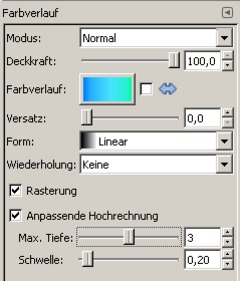
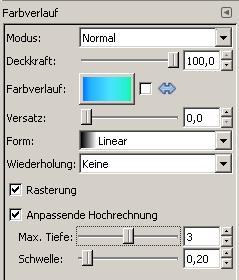
    Choose any color gradient and use the same parameters as in the image below.
    Screenshot of step 2
    Click to enlarge
  3. 3
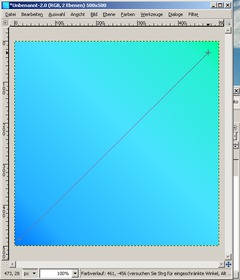
    Create the gradient (click on a point in the image, hold and drag a line)
    Screenshot of step 3
    Click to enlarge
  4. 4
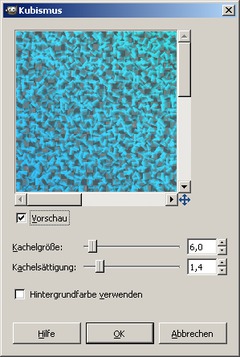
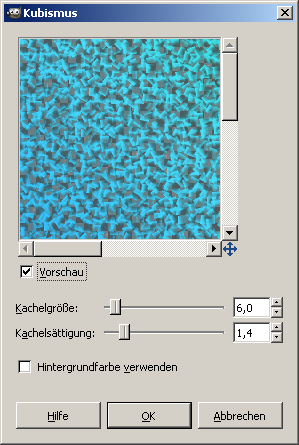
    click the right mousebutton on your image, then select Filters>Artistic>Cubism and use the same parameters as in the image below
    Screenshot of step 4
    Click to enlarge
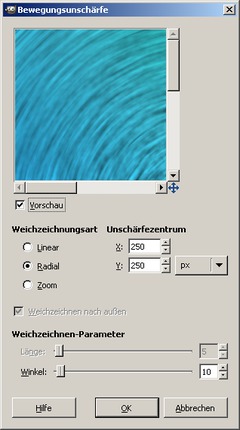
  5. 5
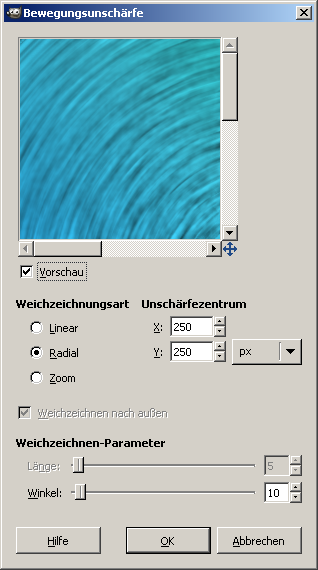
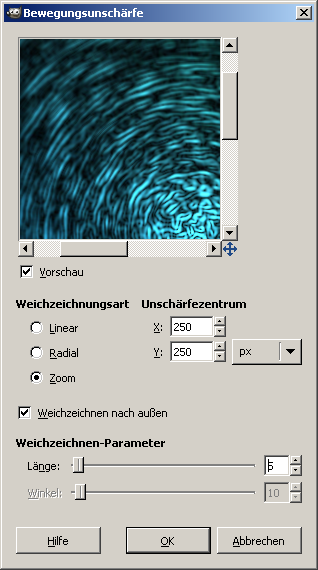
    click the right mousebutton on your image, then select filters>blur>Motion blur and use the same parameters as in the image
    Screenshot of step 5
    Click to enlarge
  6. 6
    click the right mousebutton on your image, then elect filters>blur>Gaussian Blur strength 3
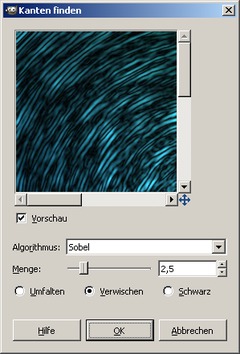
  7. 7
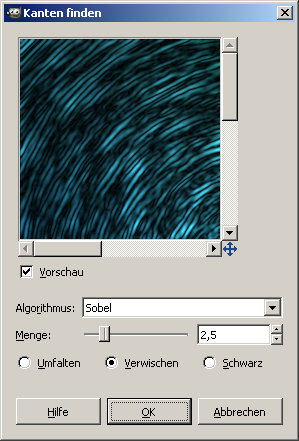
    click the right mousebutton on your image, then elect filters>Edge-Detect>Edges and use the same parameters as in the image
    Screenshot of step 7
    Click to enlarge
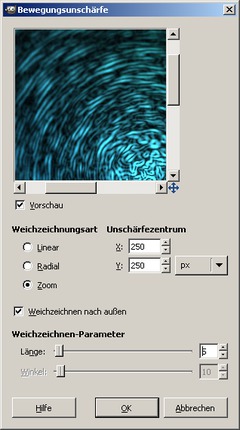
  8. 8
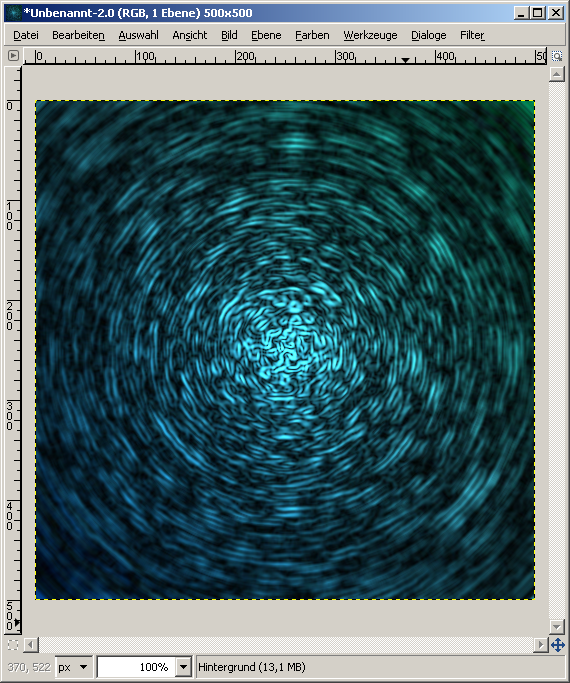
    For simulating a light depth click the right mousebutton, then select filters>Blur>Motion blur> and use the same parameters as in the image
    Screenshot of step 8
    Click to enlarge
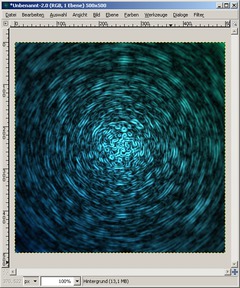
  9. 9
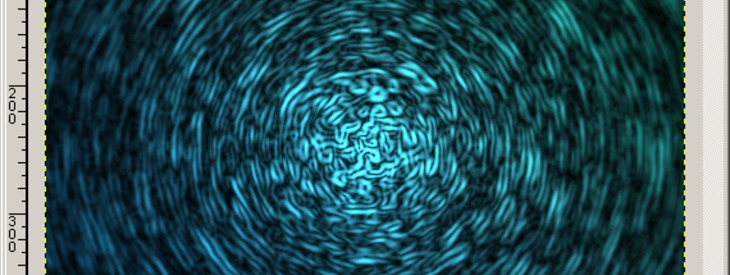
    We're done ;) I hope you like the result!
    Screenshot of step 9
    Click to enlarge

This article is licensed under the following license: Attribution-Noncommercial 3.0 Austria

Comments

Post your own comments, questions or hints here. The author and other users will see your posting and can reply to it. Of course, you can also ask in the chat.

Comments are chronologically arranged.

  1. http://www.gimpusers.com/tutorials/crazy-ions.html Sun 04 Nov 2007 04:51:07 PM CET exn, 04 Nov 2007 04:51 PM

    oh nice effect. thanks

  2. http://www.gimpusers.com/tutorials/crazy-ions.html Sun 10 Feb 2008 02:56:14 AM CET Beaniebaby2468, 10 Feb 2008 02:56 AM

    Very nice tutorial! Also, HOW DO YOU CEATE A TUTORIAL? I hve been trying forever, and can't figure it out lol... Just a random thing i made...


    Click to enlarge

  3. http://www.gimpusers.com/tutorials/crazy-ions.html Fri 05 Sep 2008 07:53:05 PM CEST Mena, 05 Sep 2008 07:53 PM

    This tutorial was very easy to follow, thanks! By the way, it looks really good mapped into a sphere.

  4. http://www.gimpusers.com/tutorials/crazy-ions.html Sun 10 May 2009 01:23:45 AM CEST wade, 10 May 2009 01:23 AM

    Thanks for the Tutorial! It was lots of fun when I tried it.

Registered users can log in (top right of the page) to use their profile name to post comments, request email notification on new comments and attach images (e.g. their versions of the effect) to their postings.

Are you human?

Adobe® Photoshop® is a registered trademark of Adobe Systems, Inc. Linux is a trademark of Linus Torvalds. Ubuntu and Canonical are registered trademarks of Canonical Ltd. | Clock times are shown as CET / CEST | Imprint / Privacy policy | powered by bitfire it services