gimpusers.com logo
German version English version

Not logged in

Sign up! | Lost password?

Latest discussion

  1. gimp-user | today 09:49 AM
    Need help: "correcting" exposures in time-lapse imagesets
  2. gimp-developer | today 06:14 AM
    GIMP color-management spec and further discussion
  3. gimp-user | yesterday 11:13 PM
    collages in gimp?
  4. gimp-developer | yesterday 07:07 PM
    Color management (UI perspective for GIMP 2.8)
  5. gimp-user | yesterday 02:42 PM
    printing

External news

Poll

Would you like to be able to use your Google/Yahoo/MSN (OpenID) login on gimpusers, too?

Definately! I would enjoy the possibility to use my OpenID on different websites!

I don't have a special need for OpenID but I think it could be useful

Doesn't matter to me

Never, OpenID is a pain regarding privacy and personal data protection!

No. (please post a comment)

See results

Stats

gimpusers.com RSS feed

RSS feed Retweet this!

05 Sep 2007 01:23 PM, by devvv (Bernhard Stockmann)

A colored swirl of light

Some effects are just very simple to do and look still pretty cool. This one here is such an effect, usable vor all kind of graphics things such as flyers, splash-screens, wallpapers etc. I'll show you how to create such an colored light swirl below!

This article has been written using GIMP 2.4 rc2. It's divided into 8 steps and takes about 12 min to complete for an average user. 46801 times read so far. Category: Simple effects, required skill: 1 of 5

30 comments have been posted so far.

Available in other languages:

  1. 1
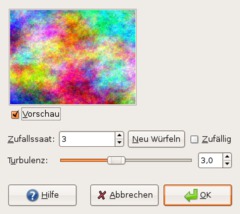
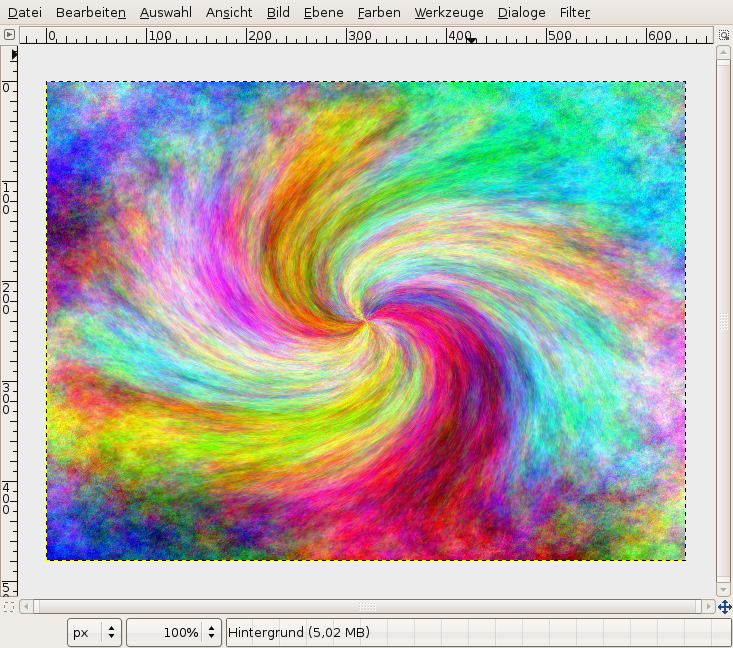
    Create a new Image. 640x480. You can take any size. Apply Filter / Render / Clouds / Plasma.
    Screenshot of step 1
    Click to enlarge
  2. 2
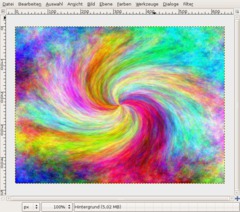
    Now do Filters / Distorts / Whirl and Pinch...

    Whirl angle: 130
    Pinch amount: 1
    Radius: 1

    It should look like that now.
    Screenshot of step 2
    Click to enlarge
  3. 3
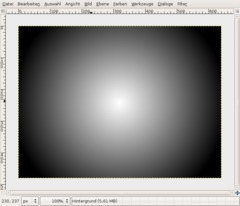
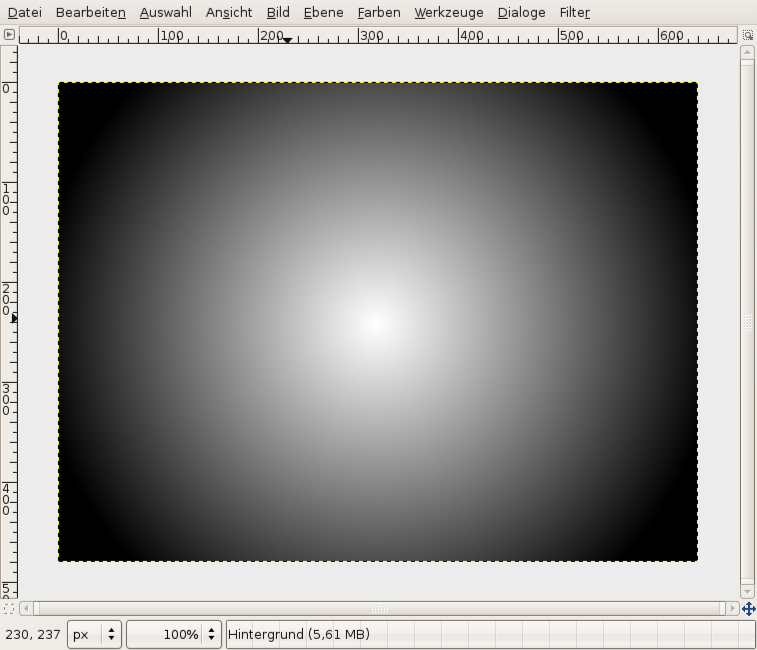
    Create a new transparent layer.

    Use the gradient tool, use white as foreground color and black as background color. The fastest way to do this pressing D to reset colors and then X to swap the colors.

    Form: Radial

    Move the gradient from the center of the image to one of the four corners.
    Screenshot of step 3
    Click to enlarge
  4. 4
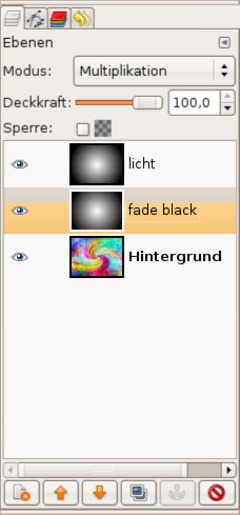
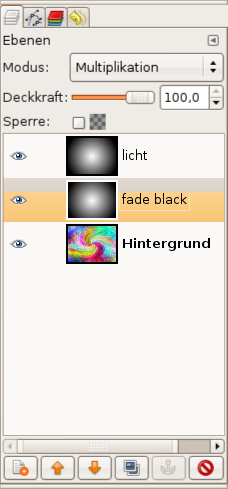
    Duplicate the layer. The original one name "fade black". For this set the layer mode to "Multiply".

    The duplicate, which should be at the top, name "light".
    Screenshot of step 4
    Click to enlarge
  5. 5
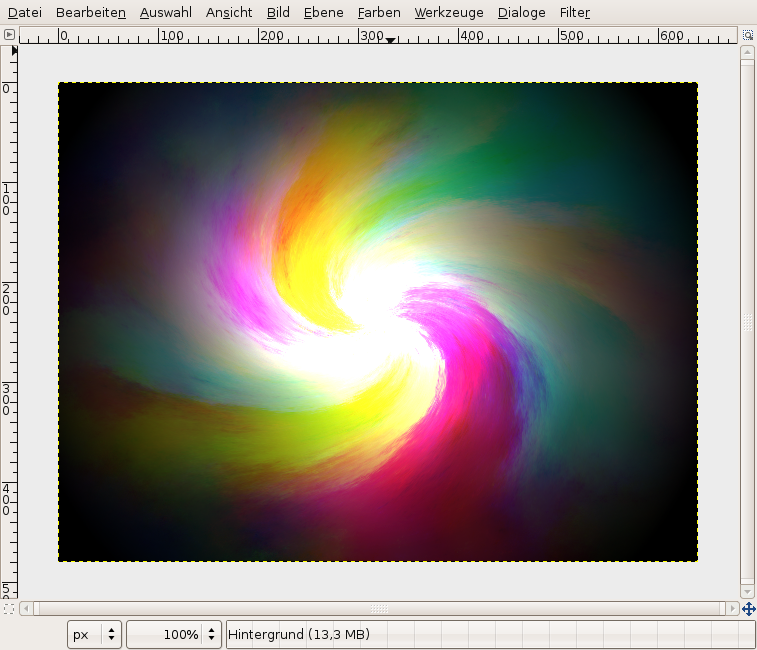
    Click the light layer.

    - Colors / Brightness & Contrast, use values -65 / +45

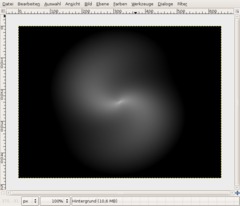
    Now apply Whirl and Pinch again. The values should be still saved from step 2, if not enter the same values. Only one value has to be changed: Pich from 1 to 0.8.

    Apply the filter.
    Screenshot of step 5
    Click to enlarge
  6. 6
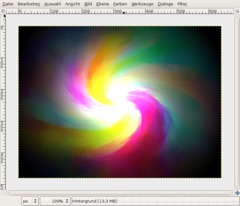
    Set the layer mode for the layer to Dodge. Duplicate the light layer to enhance the effect.

    Activate the background-layer. Filter / Blur / Selective Gaussian Blur.

    Radius: 50
    Max. Delta: 70
    Screenshot of step 6
    Click to enlarge
  7. 7
    If you want a single color use Colors / Desaturate, then Colors / Colorize or Colors / Color balance like me if you want an icy version:

    Shadows -30 / -30 / +30
    Mids: -30 / +10 / 0
    Highlights: 0 / 0 / 30

    Have fun.
    Screenshot of step 7
    Click to enlarge
  8. 8
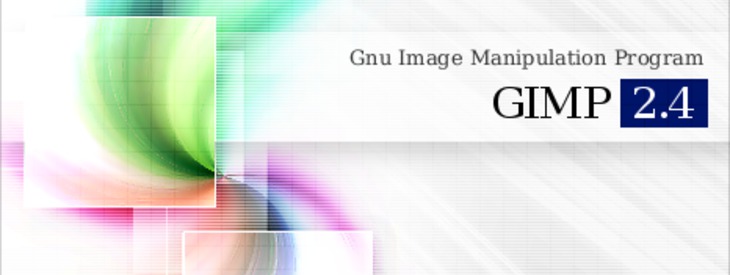
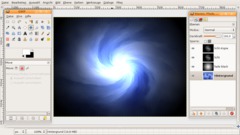
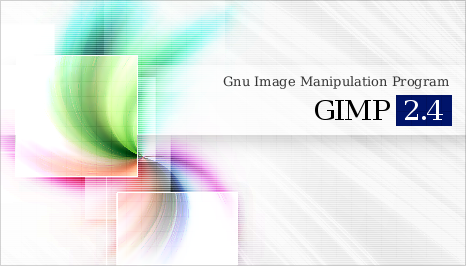
    Here is just an example i played with: a splash screen for gimp 2.4 ;)
    Screenshot of step 8
    Click to enlarge

This article is licensed under the following license: Attribution-Noncommercial 3.0 Austria

Links (pingbacks)

Comments

Post your own comments, questions or hints here. The author and other users will see your posting and can reply to it. Of course, you can also ask in the chat.

Comments are chronologically arranged.

  1. http://www.gimpusers.com/tutorials/colored-light-swirl.html Wed 05 Sep 2007 07:24:39 PM CEST henriquemaia, 05 Sep 2007 07:24 PM

    Is this howto complete? It seems to be missing something after selecting the "light" layer mode to dodge. What about the other layers?

  2. http://www.gimpusers.com/tutorials/colored-light-swirl.html Fri 07 Sep 2007 01:10:12 PM CEST devvv, 07 Sep 2007 01:10 PM

    hi! just tried it again and everything works fine. nothing is missing. why do you think something is wrong with the howto?

  3. http://www.gimpusers.com/tutorials/colored-light-swirl.html Fri 07 Sep 2007 01:40:18 PM CEST henriquemaia, 07 Sep 2007 01:40 PM

    You’re right. I have tried now and it’s ok. Great howto, by the way.

    Note to self: do not follow howtos when you’re sleepy. My apologies.

  4. http://www.gimpusers.com/tutorials/colored-light-swirl.html Fri 07 Sep 2007 08:43:12 PM CEST Ian, 07 Sep 2007 08:43 PM

    That splash screen is awesome! Best I've seen yet for Gimp! Excellent!

  5. http://www.gimpusers.com/tutorials/colored-light-swirl.html Fri 02 Nov 2007 04:08:11 AM CET Josh, 02 Nov 2007 04:08 AM

    So how do you activate the background? I couldnt do this because you didnt tell how to activate the background =[

  6. http://www.gimpusers.com/tutorials/colored-light-swirl.html Thu 08 Nov 2007 11:09:56 PM CET Lexor, 08 Nov 2007 11:09 PM

    would you send me the gimp file for the splash screen, I'd like to see how you did the change color witht eh little box things lol
    thanks

  7. http://www.gimpusers.com/tutorials/colored-light-swirl.html Fri 09 Nov 2007 08:12:25 AM CET devvv, 09 Nov 2007 08:12 AM

    i would, but since i have no email address to sent to, i can't ... ;)

  8. http://www.gimpusers.com/tutorials/colored-light-swirl.html Sun 11 Nov 2007 03:02:09 PM CET Amyk13, 11 Nov 2007 03:02 PM

    Nice splash screen! I love it!

  9. http://www.gimpusers.com/tutorials/colored-light-swirl.html Thu 15 Nov 2007 02:30:36 AM CET bluegimp, 15 Nov 2007 02:30 AM

    hi devvv, how did you do the splash screen? can you please tell on how to do that kind of artwork? thanks!

  10. http://www.gimpusers.com/tutorials/colored-light-swirl.html Thu 15 Nov 2007 03:42:45 AM CET bluegimp, 15 Nov 2007 03:42 AM

    hi devvv, can you also send me the gimp file of splash screen above?thank you

  11. http://www.gimpusers.com/tutorials/colored-light-swirl.html Thu 15 Nov 2007 03:44:40 AM CET bluegimp, 15 Nov 2007 03:44 AM

    or you can send me the tutorial of that splash screen so that i know how do you do that...

  12. http://www.gimpusers.com/tutorials/colored-light-swirl.html Sun 24 Aug 2008 02:20:32 AM CEST Anonymous, 24 Aug 2008 02:20 AM

    Ok, all is good until Whirl and Pinch. My 4 corners have disappeared in the process and the colors are off. Then the gradient isn't a circle and is transparent...not likeyours. So I gave up for the moment. Help???

  13. http://www.gimpusers.com/tutorials/colored-light-swirl.html Thu 23 Oct 2008 06:13:29 PM CEST rafi, 23 Oct 2008 06:13 PM

    Dude that splah screen is damn awesome...
    big props yo

  14. http://www.gimpusers.com/tutorials/colored-light-swirl.html Sat 15 Nov 2008 01:30:39 PM CET falloutboy, 15 Nov 2008 01:30 PM

    Nice... but how do u do the Gradient thingy?? That's my only problem...

  15. http://www.gimpusers.com/tutorials/colored-light-swirl.html Fri 26 Dec 2008 04:27:13 PM CET Airplane, 26 Dec 2008 04:27 PM

    May I know how the detail how do you make a "splash screen for gimp 2.4" from step 7 to 8?

    It was a really nice splash screen you made.

    Thanks.

  16. http://www.gimpusers.com/tutorials/colored-light-swirl.html Mon 26 Jan 2009 02:39:12 PM CET Adianna, 26 Jan 2009 02:39 PM

    I'm having difficulty with step #5 after I do the whirl and pinch the second time it doesn't give me that whirl effect.. it just stays a sphere.. I've gone over it again and again... I don't know what I'm doing wrong. Can you help?
    Thank you in advance if you can...

  17. http://www.gimpusers.com/tutorials/colored-light-swirl.html Wed 28 Jan 2009 02:47:57 AM CET Micah, 28 Jan 2009 02:47 AM

    Adianna, are you sure you're applying the whirl and pinch to the right layer?

    And my question is that I do all of the steps but the fade black layer just covers up the back layer so all i get is the Dodged and whirled top layer. Am i missing something?

  18. http://www.gimpusers.com/tutorials/colored-light-swirl.html Tue 03 Feb 2009 10:08:10 PM CET J'ann Baill, 03 Feb 2009 10:08 PM

    Thank you for this :-)

  19. http://www.gimpusers.com/tutorials/colored-light-swirl.html Wed 18 Mar 2009 05:35:53 PM CET Anonymous, 18 Mar 2009 05:35 PM

    Where do u get this picture!?!?!?!?!

  20. http://www.gimpusers.com/tutorials/colored-light-swirl.html Thu 16 Apr 2009 10:02:58 PM CEST Rachel, 16 Apr 2009 10:02 PM

    I'd love to know how to get from the end of this tutorial to the finished splash screen. Is there another tutorial that shows that process?

  21. http://www.gimpusers.com/tutorials/colored-light-swirl.html Fri 17 Apr 2009 11:50:47 PM CEST Daniel, 17 Apr 2009 11:50 PM

    Ok, im having difficulties with step 3. Im triyng to figure out how to do the gradient thing.Need help.

    P.S.: I have GIMP 2.6.6

  22. http://www.gimpusers.com/tutorials/colored-light-swirl.html Sat 09 May 2009 10:27:05 PM CEST Grant, 09 May 2009 10:27 PM

    Yeah can u send me a tutorial or how-to of somekind on how to make that last image

  23. http://www.gimpusers.com/tutorials/colored-light-swirl.html Fri 22 May 2009 06:02:56 AM CEST asdadf, 22 May 2009 06:02 AM

    This is retarded i did every exactly the way it said and it ddnt come out anything like te picture... wasted my time

  24. http://www.gimpusers.com/tutorials/colored-light-swirl.html Sun 12 Jul 2009 11:12:51 AM CEST Jack123, 12 Jul 2009 11:12 AM

    Could you send me the .xcf of the 2.4 splash screen please? Thanks =]

  25. http://www.gimpusers.com/tutorials/colored-light-swirl.html Sat 26 Sep 2009 03:20:18 PM CEST Robert, 26 Sep 2009 03:20 PM

    You rock

  26. http://www.gimpusers.com/tutorials/colored-light-swirl.html Sun 27 Sep 2009 04:32:45 PM CEST Rob K, 27 Sep 2009 04:32 PM

    This is not complete, I am having the same problem as two other people, you do not explain how to activate the background layer. The fade to black layer covers the colours, you are definitely missing a step, maybe it is a mode of layer, or something, Would be great if you could clear this up, as you have not answered the other two people either. Any help here at all would be appreciated. It is a tutorial after all.

  27. http://www.gimpusers.com/tutorials/colored-light-swirl.html Sun 27 Sep 2009 05:15:58 PM CEST devvv, 27 Sep 2009 05:15 PM

    hello, just tested it with the values from above - you just need to duplicate the swirl-layers 2 or 3 times to enhance the "light" from the middle. also you can apply a selective gaussian blur to the colored bg layer with lesser radius and strenght.

    hope that helps...

  28. http://www.gimpusers.com/tutorials/colored-light-swirl.html Wed 21 Oct 2009 11:55:59 AM CEST N.G, 21 Oct 2009 11:55 AM

    Works like a charm.
    Thanks.

  29. http://www.gimpusers.com/tutorials/colored-light-swirl.html Mon 09 Nov 2009 12:28:50 PM CET India Spiritual, 09 Nov 2009 12:28 PM

    Good one. I was looking for something like this for a long time. I am learning as of now.

  30. http://www.gimpusers.com/tutorials/colored-light-swirl.html Sun 03 Jan 2010 01:37:10 AM CET h44o, 03 Jan 2010 01:37 AM

    hi, i had troubles with step 6(layer mode dodge) but now everything is good,thx :)

Registered users can log in (top right of the page) to use their profile name to post comments, request email notification on new comments and attach images (e.g. their versions of the effect) to their postings.

Are you human?

Adobe® Photoshop® is a registered trademark of Adobe Systems, Inc. Linux is a trademark of Linus Torvalds. Ubuntu and Canonical are registered trademarks of Canonical Ltd. | Clock times are shown as CET / CEST | Imprint / Privacy policy | powered by bitfire it services